![Chalkstring Logo.png]](https://support.chalkstring.com/hs-fs/hubfs/Chalkstring%20Logo.png?height=40&name=Chalkstring%20Logo.png)
In this article
Tender formats
There are various different template formats Chalkstring can produce a tender in. This article covers the Grouped Products formats for both with and without zone details.
The 'Grouped Products | Bill format with zones' format produces and exported tender including any products groups which have been setup in Chalkstring. This format more closely mirrors a 'Industry standard' type bill format. See the example below.
Product groups must be setup via the rate build up page before using this tender format.
The 'Grouped Products | Bill format with zones' tender export format.
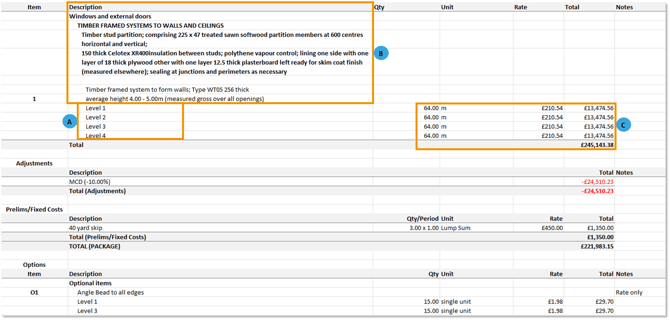
A. Zones details
Shows the different zones where quantities are required for a product
B. Product details
Shows the different products, names and descriptions. These will be split out in the same format and order as the groups have been setup on the rate build up page in Chalkstring.
C. Product values and quantities
Shows the individual zone rate, quantities and total value.
The 'Group products | Bill format' is the same format as the above apart from the total product quantities and value will be displayed rather than showing the zone split quantities and values.
How to change to tender format
- Expand the main Chalkstring black menu bar and click the ‘Projects’ menu.
- Select the project that you want to view the assessment for.
- From the 'Work packages' section, locate the work package and assessment you require.
- Click the assessment name.
The assessment configuration page gives the option to change your document formats in which you want your tender and subsequent application documents to be exported.
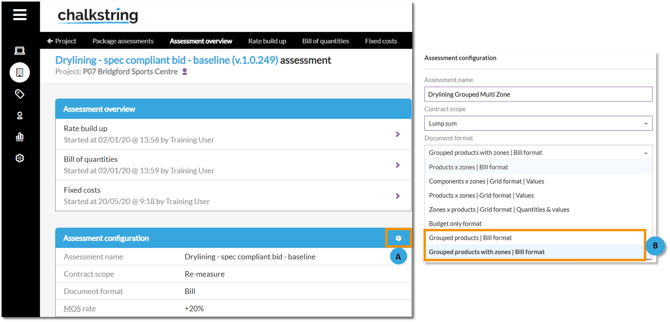
A. Click the white cog button to open the 'Assessment configuration' page
B. Select the contract scope type, re-measure or lump sum.
C. Choose from the document formats
'Products x zones | Bill format'
'Components x zones | Grid format | Values'
'Products x zones | Grid format | Cumulative values'
'Zones x products | Grid format | Quantities & values'.
'Budget only format'
'Grouped products | Bill format'
'Grouped product with zones | Bill format'
The template format selected from the assessment configuration page will also update the format your applications for payment are produced in. Your applications will be the same as the tender format, but will also include additional columns for progress completed, value being applied for and outstanding values.
