![Chalkstring Logo.png]](https://support.chalkstring.com/hs-fs/hubfs/Chalkstring%20Logo.png?height=40&name=Chalkstring%20Logo.png)
In this article
What is the export feature?
When you are working within a takeoff drawing you may wish to export some of the information from the drawing.
The export feature allows you to create a PDF with different elements of the data from the takeoff. It also has an option to export the bill of quantities spreadsheet with all of the measures or the individual measurements from the drawing.
How to use the export
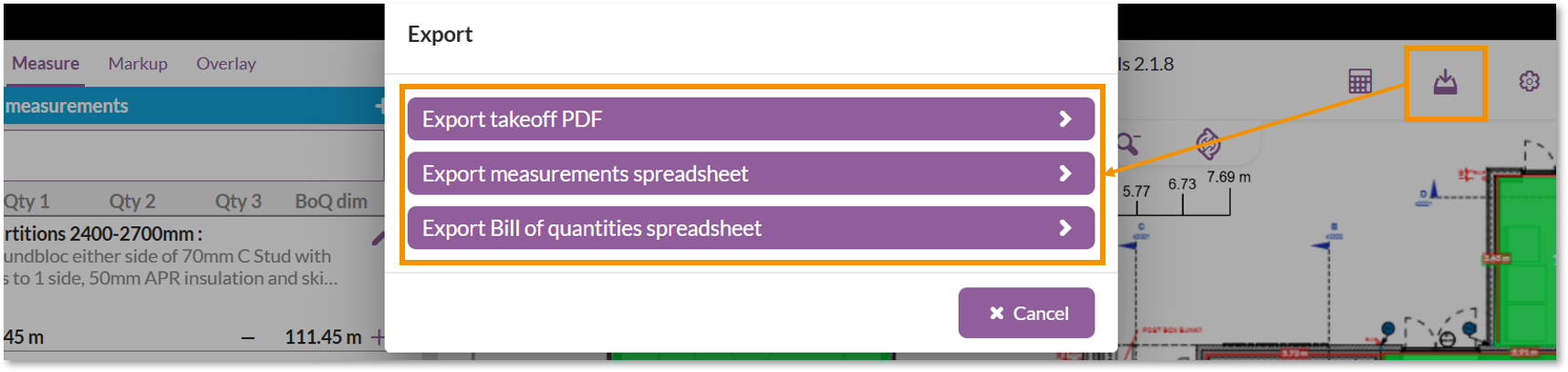
- From within your drawing click on the export icon in the top right toolbar.
- This will give you two options:
- Export takeoff PDF
- Export Bill of quantities spreadsheet
- Export measurements spreadsheet
Export takeoff PDF
Selecting the Export takeoff PDF option will provide the following options:

- Background drawing with no measurements - this will include a page in the PDF containing just the original background drawing with no measures.
- Drawing with measurements - this will include a page in the PDF showing the drawing with any measurements made, followed by a table with the details of the measurements
- Measurements table - this will include a page in the PDF showing a table with the details of the measurements
- Markup and comments - this will include a page in the PDF showing the drawing with any markup items, followed by a table with any comments added to the markup layer.
- Label measurements in drawing - this will add the measurement value and label to any measurement lines on the drawing .
- Page orientation - this will determine whether the PDF pages are portrait or landscape orientation

Example of labels for measurement values and names
Export Bill of quantities spreadsheet
Selecting the Export Bill of quantities spreadsheet option will open a window asking where you want to save the file, or will download the file to your downloads folder, depending on the settings in your browser.

The bill of quantities spreadsheet provides a summary of the products and quantities from the takeoff.
Export measurements spreadsheet
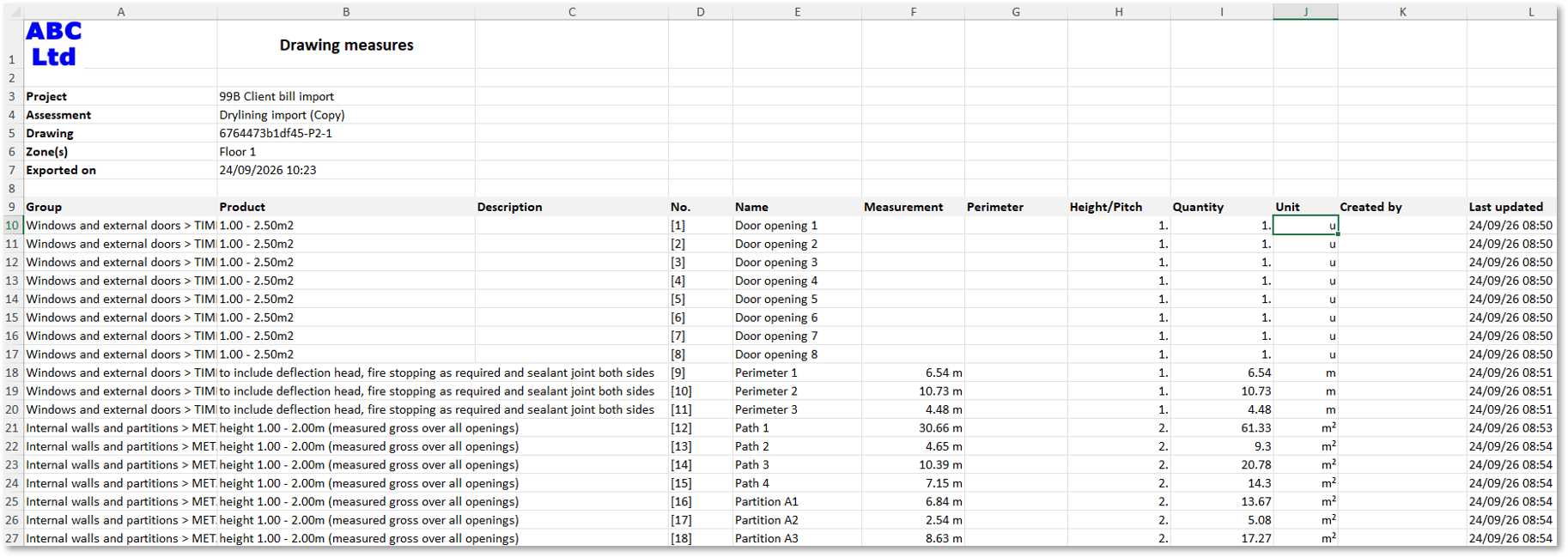
Selecting the Export measurements spreadsheet option will download an Excel spreadsheet containing the individual measurements from the drawing.
The spreadsheet includes one row per measurement, making it easy to review, filter and sort the measurement data in Excel.
The spreadsheet includes the following information:
- Group, Product, Description, No., Name, Measurement, Perimeter, Height/Pitch, Quantity, Unit, Created by, Last updated.
Only products that are ticked in the product list on the left of the Takeoff screen will be included in the export. If a ticked product does not have any measurements, it will still be included in the spreadsheet, but the measurement fields will be blank.
If no products are ticked, the Export measurements spreadsheet option will be unavailable. Tick at least one product in the product list to enable the export.
The measurements spreadsheet exports the measurements for the drawing you are currently viewing.
If you need measurement data from another drawing, open that drawing and export the spreadsheet separately.