![Chalkstring Logo.png]](https://support.chalkstring.com/hs-fs/hubfs/Chalkstring%20Logo.png?height=40&name=Chalkstring%20Logo.png)
In this article
- What is the pitch roof calculation and when to use it
- How to set a pitch angle
- How pitch adjustments are applied to measurements
- What to expect in the measurement list and PDF output
- Want to know more?
What is the pitch roof calculation and when to use it
If you're measuring pitched roof surfaces from plan drawings, you'll typically need to apply an adjustment to account for the incline. Chalkstring makes this easier by allowing you to apply a pitch angle directly to a product — it will then calculate the correct adjustment factor for you.
This helps save time, reduce manual errors, and ensures consistent, accurate results across your assessment. It’s particularly useful for roofing and cladding subcontractors who measure off plan and need to account for sloped surfaces.
How to set a pitch angle
Measures can be moved to another product in the same drawing if required
To apply a pitch adjustment:
- In Takeoff, select the product you want to measure to.
- In the product panel, click the 'Edit pencil' for the product you want to adjust.
- In the "Measurement Multiplier" section select Pitch angle.
- Enter the pitch angle in degrees (between 0° and 89°).
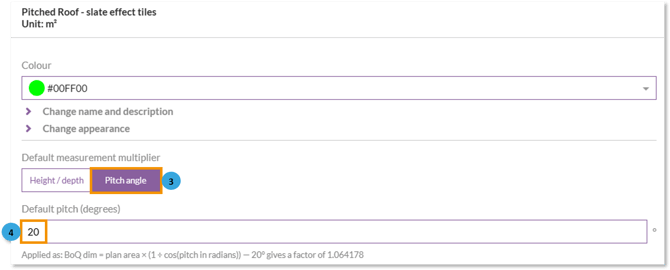
Once the angle is entered, the pitch factor will be shown beneath — this is the multiplier that will be applied to all measurements using that product.
How pitch adjustments are applied to measurements
Once a product has pitch angle mode applied:
- The pitch multiplier is automatically used when measurements are drawn.
- All measurement types — area, path, and count — will use the multiplier.
- Valid pitch angles are 0 to 89 degrees
- In the add measure popup, you'll see the multiplier listed beneath the pitch value.
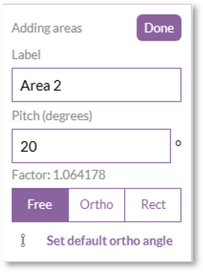
If you’re measuring areas with a pitch applied, the perimeter will not be calculated.
What to expect in the measurement list and PDF output
When reviewing your takeoff:
- A Qty 3 column is shown in the measurement list to display the pitch factor (or height/depth if used instead).
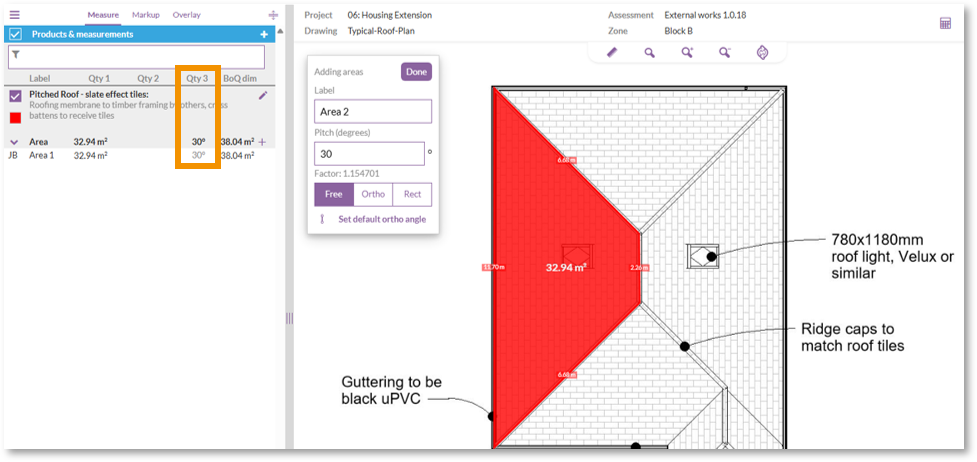
- In the takeoff PDF export, a Height/Pitch column appears if any product has pitch applied — keeping your submission fully traceable and clear for clients.
Want to know more?
- Takeoff - Overlay
- Takeoff - Editing existing measures
- Takeoff - How to set formatting options
- Takeoff - Adding products
